如何在数据库上添加语义层
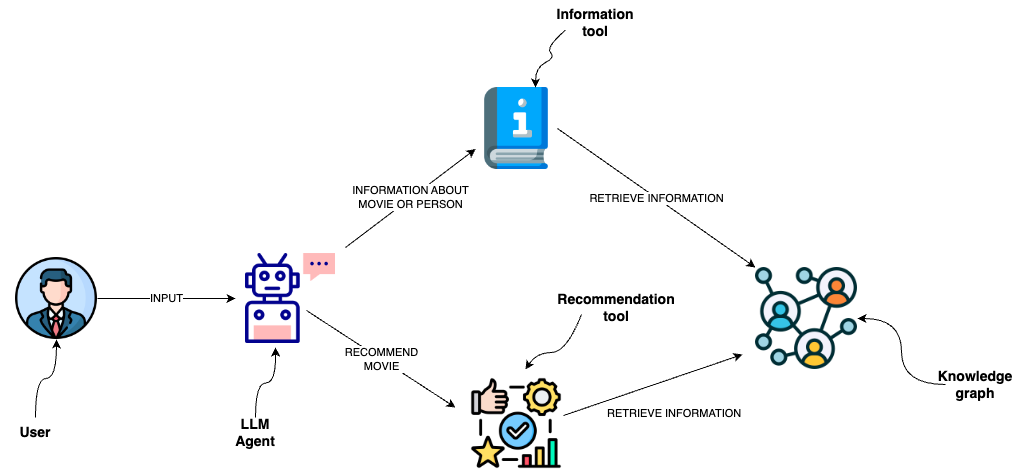
你可以使用数据库查询从图数据库(如 Neo4j)中检索信息。 一个可选方案是使用大语言模型(LLM)生成 Cypher 语句。 虽然这个选项提供了极佳的灵活性,但该解决方案可能不够稳定,无法持续生成精确的 Cypher 语句。 除了生成 Cypher 语句之外,我们还可以在语义层中将 Cypher 模板实现为工具,供 LLM 代理进行交互使用。
danger
本指南中的代码将对提供的数据库执行 Cypher 语句。 在生产环境中,请确保数据库连接使用的凭据权限范围狭窄,仅包含必要的权限。
如果不这样做,可能会导致数据损坏或丢失,因为调用代码 可能会在被适当提示时尝试执行删除、修改数据的命令 或者在数据库中存在敏感数据时读取这些数据。
配置
安装依赖
:::提示 请参阅安装集成包的一般说明部分。 :::
- npm
- yarn
- pnpm
npm i langchain @langchain/community @langchain/openai @langchain/core neo4j-driver zod
yarn add langchain @langchain/community @langchain/openai @langchain/core neo4j-driver zod
pnpm add langchain @langchain/community @langchain/openai @langchain/core neo4j-driver zod
设置环境变量
在此示例中,我们将使用 OpenAI:
OPENAI_API_KEY=your-api-key

# 可选,使用 LangSmith 获取最佳观测性
LANGSMITH_API_KEY=your-api-key
LANGSMITH_TRACING=true

# 如果你不在无服务器环境中,请减少追踪延迟
# LANGCHAIN_CALLBACKS_BACKGROUND=true
接下来,我们需要定义 Neo4j 凭证。 请按照 这些安装步骤 来设置 Neo4j 数据库。
NEO4J_URI="bolt://localhost:7687"
NEO4J_USERNAME="neo4j"
NEO4J_PASSWORD="password"
以下示例将创建一个与 Neo4j 数据库的连接,并用有关电影及其演员的示例数据填充该数据库。
import "neo4j-driver";
import { Neo4jGraph } from "@langchain/community/graphs/neo4j_graph";

const url = process.env.NEO4J_URI;
const username = process.env.NEO4J_USER;
const password = process.env.NEO4J_PASSWORD;
const graph = await Neo4jGraph.initialize({ url, username, password });

// Import movie information
const moviesQuery = `LOAD CSV WITH HEADERS FROM
'https://raw.githubusercontent.com/tomasonjo/blog-datasets/main/movies/movies_small.csv'
AS row
MERGE (m:Movie {id:row.movieId})
SET m.released = date(row.released),
    m.title = row.title,
    m.imdbRating = toFloat(row.imdbRating)
FOREACH (director in split(row.director, '|') |
    MERGE (p:Person {name:trim(director)})
    MERGE (p)-[:DIRECTED]->(m))
FOREACH (actor in split(row.actors, '|') |
    MERGE (p:Person {name:trim(actor)})
    MERGE (p)-[:ACTED_IN]->(m))
FOREACH (genre in split(row.genres, '|') |
    MERGE (g:Genre {name:trim(genre)})
    MERGE (m)-[:IN_GENRE]->(g))`;

await graph.query(moviesQuery);
Schema refreshed successfully.
[]
使用 Cypher 模板的自定义工具
语义层由各种工具组成,这些工具暴露给 LLM,供其用于与知识图谱进行交互。 这些工具可以具有不同的复杂度。你可以将语义层中的每个工具看作是一个函数。
我们将要实现的函数是检索有关电影或其演职人员的信息。
const descriptionQuery = `MATCH (m:Movie|Person)
WHERE m.title CONTAINS $candidate OR m.name CONTAINS $candidate
MATCH (m)-[r:ACTED_IN|HAS_GENRE]-(t)
WITH m, type(r) as type, collect(coalesce(t.name, t.title)) as names
WITH m, type+": "+reduce(s="", n IN names | s + n + ", ") as types
WITH m, collect(types) as contexts
WITH m, "type:" + labels(m)[0] + "\ntitle: "+ coalesce(m.title, m.name)
       + "\nyear: "+coalesce(m.released,"") +"\n" +
       reduce(s="", c in contexts | s + substring(c, 0, size(c)-2) +"\n") as context
RETURN context LIMIT 1`;

const getInformation = async (entity: string) => {
  try {
    const data = await graph.query(descriptionQuery, { candidate: entity });
    return data[0]["context"];
  } catch (error) {
    return "No information was found";
  }
};
你可以观察到,我们已经定义了用于检索信息的 Cypher 语句。 因此,我们可以避免生成 Cypher 语句,而仅使用 LLM 代理来填充输入参数。 为了向 LLM 代理提供有关何时使用工具及其输入参数的附加信息,我们将函数封装为工具。
import { tool } from "@langchain/core/tools";
import { z } from "zod";

const informationTool = tool(
  (input) => {
    return getInformation(input.entity);
  },
  {
    name: "Information",
    description:
      "useful for when you need to answer questions about various actors or movies",
    schema: z.object({
      entity: z
        .string()
        .describe("movie or a person mentioned in the question"),
    }),
  }
);
OpenAI 代理
LangChain 表达式语言使得通过语义层与图数据库交互的代理定义变得非常便捷。
import { ChatOpenAI } from "@langchain/openai";
import { AgentExecutor } from "langchain/agents";
import { formatToOpenAIFunctionMessages } from "langchain/agents/format_scratchpad";
import { OpenAIFunctionsAgentOutputParser } from "langchain/agents/openai/output_parser";
import { convertToOpenAIFunction } from "@langchain/core/utils/function_calling";
import {
  ChatPromptTemplate,
  MessagesPlaceholder,
} from "@langchain/core/prompts";
import { AIMessage, BaseMessage, HumanMessage } from "@langchain/core/messages";
import { RunnableSequence } from "@langchain/core/runnables";

const llm = new ChatOpenAI({ model: "gpt-3.5-turbo", temperature: 0 });
const tools = [informationTool];

const llmWithTools = llm.bind({
  functions: tools.map(convertToOpenAIFunction),
});

const prompt = ChatPromptTemplate.fromMessages([
  [
    "system",
    "You are a helpful assistant that finds information about movies and recommends them. If tools require follow up questions, make sure to ask the user for clarification. Make sure to include any available options that need to be clarified in the follow up questions Do only the things the user specifically requested.",
  ],
  new MessagesPlaceholder("chat_history"),
  ["human", "{input}"],
  new MessagesPlaceholder("agent_scratchpad"),
]);

const _formatChatHistory = (chatHistory) => {
  const buffer: Array<BaseMessage> = [];
  for (const [human, ai] of chatHistory) {
    buffer.push(new HumanMessage({ content: human }));
    buffer.push(new AIMessage({ content: ai }));
  }
  return buffer;
};

const agent = RunnableSequence.from([
  {
    input: (x) => x.input,
    chat_history: (x) => {
      if ("chat_history" in x) {
        return _formatChatHistory(x.chat_history);
      }
      return [];
    },
    agent_scratchpad: (x) => {
      if ("steps" in x) {
        return formatToOpenAIFunctionMessages(x.steps);
      }
      return [];
    },
  },
  prompt,
  llmWithTools,
  new OpenAIFunctionsAgentOutputParser(),
]);

const agentExecutor = new AgentExecutor({ agent, tools });
await agentExecutor.invoke({ input: "Who played in Casino?" });
{
  input: "Who played in Casino?",
  output: 'The movie "Casino" starred James Woods, Joe Pesci, Robert De Niro, and Sharon Stone.'
}