如何使用聊天模型调用工具
本指南假定您熟悉以下概念:
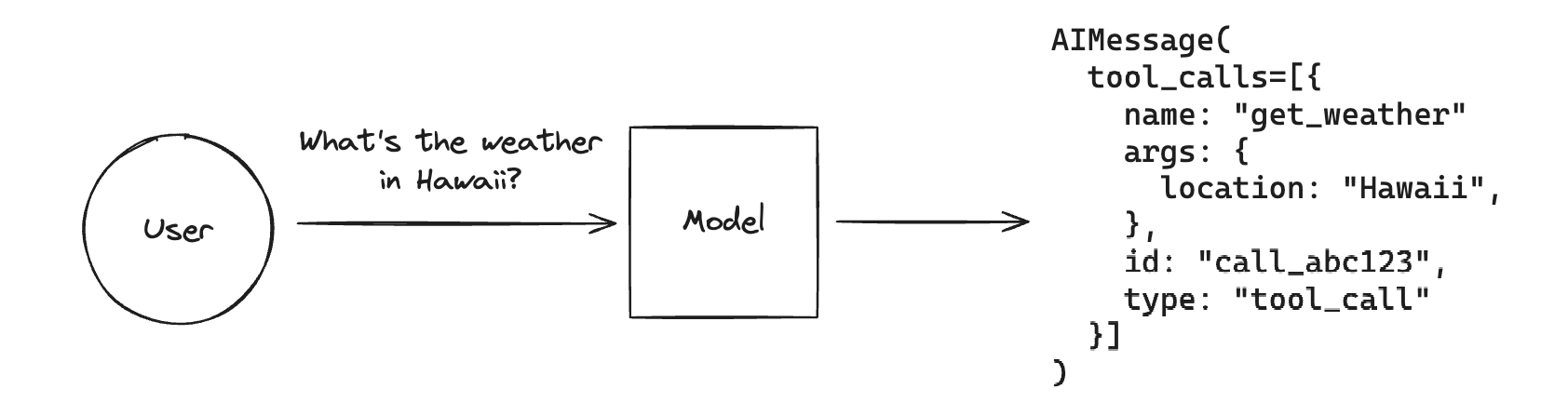
工具调用 允许聊天模型通过“调用工具”来响应给定的提示。
请注意,尽管名称“工具调用”暗示模型正在直接执行某些操作,但实际情况并非如此!模型仅生成工具的参数,而是否实际运行该工具则取决于用户。
工具调用是一种从模型生成结构化输出的通用技术,即使您不打算调用任何工具,也可以使用它。一个典型的应用场景是从非结构化文本中提取信息。
如果您想知道如何使用模型生成的工具调用来实际运行一个工具函数,请参考本指南。
LangChain 实现了用于定义工具、将工具传递给 LLM 以及表示工具调用的标准接口。 本指南将介绍如何将工具绑定到 LLM,然后调用 LLM 来生成这些参数。
LangChain 实现了用于定义工具、将工具传递给 LLM 以及表示工具调用的标准接口。 本指南将向您展示如何使用它们。
向聊天模型传递工具
支持工具调用功能的聊天模型实现了一个.bindTools()方法,该方法
接收一个 LangChain
工具对象列表
并以模型期望的格式将它们绑定到聊天模型上。后续对聊天模型的调用将在其对 LLM 的调用中包含工具模式。
从@langchain/core版本0.2.9开始,所有具备工具调用功能的聊天模型现在都支持OpenAI格式的工具。
我们来看一个例子:
Pick your chat model:
- Anthropic
- OpenAI
- MistralAI
- FireworksAI
Install dependencies
- npm
- yarn
- pnpm
npm i @langchain/anthropic @langchain/core
yarn add @langchain/anthropic @langchain/core
pnpm add @langchain/anthropic @langchain/core
Add environment variables
ANTHROPIC_API_KEY=your-api-key
Instantiate the model
import { ChatAnthropic } from "@langchain/anthropic";

const llm = new ChatAnthropic({
  model: "claude-3-5-sonnet-20240620",
  temperature: 0
});
Install dependencies
- npm
- yarn
- pnpm
npm i @langchain/openai @langchain/core
yarn add @langchain/openai @langchain/core
pnpm add @langchain/openai @langchain/core
Add environment variables
OPENAI_API_KEY=your-api-key
Instantiate the model
import { ChatOpenAI } from "@langchain/openai";

const llm = new ChatOpenAI({
  model: "gpt-4o-mini",
  temperature: 0
});
Install dependencies
- npm
- yarn
- pnpm
npm i @langchain/mistralai @langchain/core
yarn add @langchain/mistralai @langchain/core
pnpm add @langchain/mistralai @langchain/core
Add environment variables
MISTRAL_API_KEY=your-api-key
Instantiate the model
import { ChatMistralAI } from "@langchain/mistralai";

const llm = new ChatMistralAI({
  model: "mistral-large-latest",
  temperature: 0
});
Install dependencies
- npm
- yarn
- pnpm
npm i @langchain/community @langchain/core
yarn add @langchain/community @langchain/core
pnpm add @langchain/community @langchain/core
Add environment variables
FIREWORKS_API_KEY=your-api-key
Instantiate the model
import { ChatFireworks } from "@langchain/community/chat_models/fireworks";

const llm = new ChatFireworks({
  model: "accounts/fireworks/models/llama-v3p1-70b-instruct",
  temperature: 0
});
我们可以使用 .bindTools() 方法来处理从 LangChain
工具到我们模型提供商特定格式的转换,并将其绑定到模型(即每次调用模型时传入该工具)。许多模型实现了辅助方法,可以负责将不同类型的类函数对象格式化并绑定到模型上。
让我们创建一个新的工具,实现一个 Zod schema,然后将其绑定到模型:
tool 函数在 @langchain/core 版本 0.2.7 及以上版本中可用。
如果你使用的是较早版本的 core 包,应该使用并实例化 DynamicStructuredTool。
import { tool } from "@langchain/core/tools";
import { z } from "zod";

/**
 * Note that the descriptions here are crucial, as they will be passed along
 * to the model along with the class name.
 */
const calculatorSchema = z.object({
  operation: z
    .enum(["add", "subtract", "multiply", "divide"])
    .describe("The type of operation to execute."),
  number1: z.number().describe("The first number to operate on."),
  number2: z.number().describe("The second number to operate on."),
});

const calculatorTool = tool(
  async ({ operation, number1, number2 }) => {
    // Functions must return strings
    if (operation === "add") {
      return `${number1 + number2}`;
    } else if (operation === "subtract") {
      return `${number1 - number2}`;
    } else if (operation === "multiply") {
      return `${number1 * number2}`;
    } else if (operation === "divide") {
      return `${number1 / number2}`;
    } else {
      throw new Error("Invalid operation.");
    }
  },
  {
    name: "calculator",
    description: "Can perform mathematical operations.",
    schema: calculatorSchema,
  }
);

const llmWithTools = llm.bindTools([calculatorTool]);
现在,让我们调用它!我们期望模型使用计算器来回答这个问题:
const res = await llmWithTools.invoke("What is 3 * 12");

console.log(res);
AIMessage {
  "id": "chatcmpl-9p1Ib4xfxV4yahv2ZWm1IRb1fRVD7",
  "content": "",
  "additional_kwargs": {
    "tool_calls": [
      {
        "id": "call_CrZkMP0AvUrz7w9kim0splbl",
        "type": "function",
        "function": "[Object]"
      }
    ]
  },
  "response_metadata": {
    "tokenUsage": {
      "completionTokens": 24,
      "promptTokens": 93,
      "totalTokens": 117
    },
    "finish_reason": "tool_calls",
    "system_fingerprint": "fp_400f27fa1f"
  },
  "tool_calls": [
    {
      "name": "calculator",
      "args": {
        "operation": "multiply",
        "number1": 3,
        "number2": 12
      },
      "type": "tool_call",
      "id": "call_CrZkMP0AvUrz7w9kim0splbl"
    }
  ],
  "invalid_tool_calls": [],
  "usage_metadata": {
    "input_tokens": 93,
    "output_tokens": 24,
    "total_tokens": 117
  }
}
如我们所见,我们的 LLM 为工具生成了参数!
注意: 如果您发现模型没有为特定提示调用所需的工具,可以参考如何强制 LLM 调用工具的指南,而不是让模型自行决定。
点击此处查看上述内容的LangSmith追踪。
工具调用
如果一个 LLM 响应中包含工具调用,它们将作为工具调用对象的列表
附加到相应的
消息
或消息块
的.tool_calls属性中。
ToolCall
是一个带有工具名称、参数值字典以及(可选的)标识符的类型化字典。没有工具调用的消息此属性默认为空列表。
聊天模型可以同时调用多个工具。以下是一个示例:
const res = await llmWithTools.invoke("What is 3 * 12? Also, what is 11 + 49?");

res.tool_calls;
[
  {
    name: 'calculator',
    args: { operation: 'multiply', number1: 3, number2: 12 },
    type: 'tool_call',
    id: 'call_01lvdk2COLV2hTjRUNAX8XWH'
  },
  {
    name: 'calculator',
    args: { operation: 'add', number1: 11, number2: 49 },
    type: 'tool_call',
    id: 'call_fB0vo8VC2HRojZcj120xIBxM'
  }
]
.tool_calls
属性应包含有效的工具调用。请注意,有时模型提供商会输出格式错误的工具调用(例如,参数不是有效的
JSON)。在这种情况下解析失败时,会将
InvalidToolCall
的实例填充到 .invalid_tool_calls 属性中。一个 InvalidToolCall
可以包含名称、字符串参数、标识符和错误信息。
绑定模型特定格式(高级)
不同的提供商会采用不同的工具模式格式约定。例如,OpenAI 使用如下格式:
type:工具的类型。在撰写本文时,该值始终为 “function”。function:包含工具参数的对象。function.name:要输出的模式名称。function.description:对要输出模式的高层描述。function.parameters:你想要提取的模式的嵌套细节,以 JSON 模式 对象的格式表示。
如有需要,我们可以直接将这种模型特定格式绑定到模型上。以下是一个示例:
import { ChatOpenAI } from "@langchain/openai";

const model = new ChatOpenAI({ model: "gpt-4o" });

const modelWithTools = model.bind({
  tools: [
    {
      type: "function",
      function: {
        name: "calculator",
        description: "Can perform mathematical operations.",
        parameters: {
          type: "object",
          properties: {
            operation: {
              type: "string",
              description: "The type of operation to execute.",
              enum: ["add", "subtract", "multiply", "divide"],
            },
            number1: { type: "number", description: "First integer" },
            number2: { type: "number", description: "Second integer" },
          },
          required: ["number1", "number2"],
        },
      },
    },
  ],
});

await modelWithTools.invoke(`Whats 119 times 8?`);
AIMessage {
  "id": "chatcmpl-9p1IeP7mIp3jPn1wgsP92zxEfNo7k",
  "content": "",
  "additional_kwargs": {
    "tool_calls": [
      {
        "id": "call_P5Xgyi0Y7IfisaUmyapZYT7d",
        "type": "function",
        "function": "[Object]"
      }
    ]
  },
  "response_metadata": {
    "tokenUsage": {
      "completionTokens": 24,
      "promptTokens": 85,
      "totalTokens": 109
    },
    "finish_reason": "tool_calls",
    "system_fingerprint": "fp_400f27fa1f"
  },
  "tool_calls": [
    {
      "name": "calculator",
      "args": {
        "operation": "multiply",
        "number1": 119,
        "number2": 8
      },
      "type": "tool_call",
      "id": "call_P5Xgyi0Y7IfisaUmyapZYT7d"
    }
  ],
  "invalid_tool_calls": [],
  "usage_metadata": {
    "input_tokens": 85,
    "output_tokens": 24,
    "total_tokens": 109
  }
}
这在功能上等同于上面的 bind_tools() 调用。
下一步
现在你已经学习了如何将工具模式绑定到聊天模型,并让模型调用工具。
接下来,请查看以下指南,了解如何通过调用函数并将结果返回给模型来实际使用该工具:
你还可以查看一些更具体的工具调用用法: