如何减少检索延迟
前提条件
一种减少检索延迟的方法是使用一种称为“自适应检索(Adaptive Retrieval)”的技术。
MatryoshkaRetriever 使用
Matryoshka Representation Learning (MRL) 技术,通过两个步骤为给定查询检索文档:
首次检索:使用来自 MRL 嵌入的低维子向量进行初始快速但准确度较低的搜索。
二次检索:使用完整高维嵌入对首次检索的结果进行重新排序,以提高准确度。
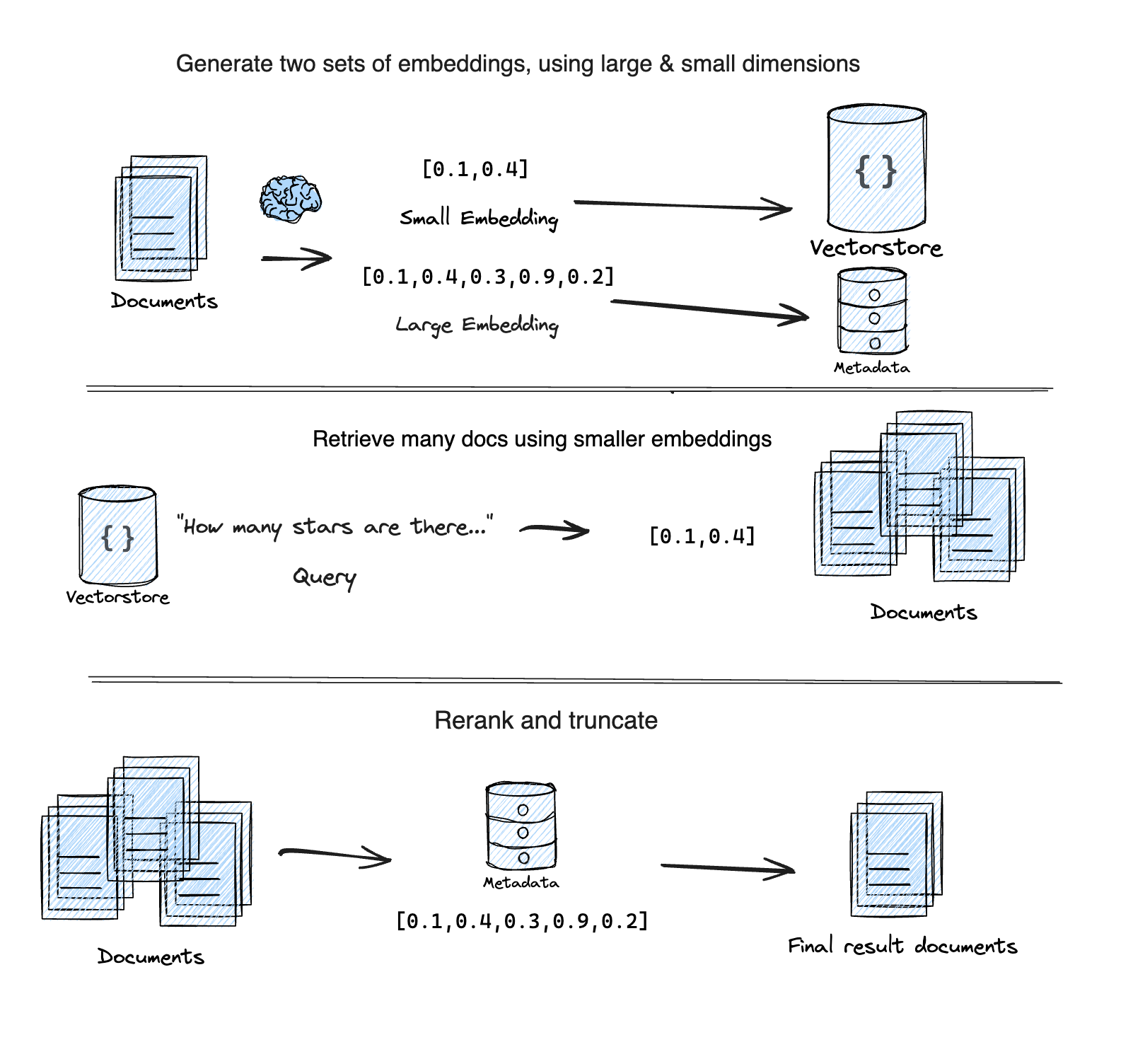
它基于这篇 Supabase 博客文章 "Matryoshka embeddings: faster OpenAI vector search using Adaptive Retrieval"。
安装设置
:::提示 请参阅安装集成包的一般说明部分。 :::
- npm
- Yarn
- pnpm
npm install @langchain/openai @langchain/community @langchain/core
yarn add @langchain/openai @langchain/community @langchain/core
pnpm add @langchain/openai @langchain/community @langchain/core
要运行以下示例,您需要一个 OpenAI API 密钥:
export OPENAI_API_KEY=your-api-key
我们还将使用 chroma 作为我们的向量存储。请按照 此处 的说明进行设置。
import { MatryoshkaRetriever } from "langchain/retrievers/matryoshka_retriever";
import { Chroma } from "@langchain/community/vectorstores/chroma";
import { OpenAIEmbeddings } from "@langchain/openai";
import { Document } from "@langchain/core/documents";
import { faker } from "@faker-js/faker";

const smallEmbeddings = new OpenAIEmbeddings({
  model: "text-embedding-3-small",
  dimensions: 512, // Min number for small
});

const largeEmbeddings = new OpenAIEmbeddings({
  model: "text-embedding-3-large",
  dimensions: 3072, // Max number for large
});

const vectorStore = new Chroma(smallEmbeddings, {
  numDimensions: 512,
});

const retriever = new MatryoshkaRetriever({
  vectorStore,
  largeEmbeddingModel: largeEmbeddings,
  largeK: 5,
});

const irrelevantDocs = Array.from({ length: 250 }).map(
  () =>
    new Document({
      pageContent: faker.lorem.word(7), // Similar length to the relevant docs
    })
);
const relevantDocs = [
  new Document({
    pageContent: "LangChain is an open source github repo",
  }),
  new Document({
    pageContent: "There are JS and PY versions of the LangChain github repos",
  }),
  new Document({
    pageContent: "LangGraph is a new open source library by the LangChain team",
  }),
  new Document({
    pageContent: "LangChain announced GA of LangSmith last week!",
  }),
  new Document({
    pageContent: "I heart LangChain",
  }),
];
const allDocs = [...irrelevantDocs, ...relevantDocs];

/**
 * IMPORTANT:
 * The `addDocuments` method on `MatryoshkaRetriever` will
 * generate the small AND large embeddings for all documents.
 */
await retriever.addDocuments(allDocs);

const query = "What is LangChain?";
const results = await retriever.invoke(query);
console.log(results.map(({ pageContent }) => pageContent).join("\n"));

/**
  I heart LangChain
  LangGraph is a new open source library by the LangChain team
  LangChain is an open source github repo
  LangChain announced GA of LangSmith last week!
  There are JS and PY versions of the LangChain github repos
*/
API Reference:
- MatryoshkaRetriever from
langchain/retrievers/matryoshka_retriever - Chroma from
@langchain/community/vectorstores/chroma - OpenAIEmbeddings from
@langchain/openai - Document from
@langchain/core/documents
note
由于某些向量存储的限制,大型嵌入元数据字段在存储之前会被序列化(JSON.stringify)。这意味着从向量存储中检索时需要对元数据字段进行解析(JSON.parse)。
下一步
您现在已经学习了一种可以加快检索查询的技术。
接下来,查看关于 RAG 的完整教程,或查看本节内容学习如何 在任何数据源上创建自定义检索器。